

Setting up and taking care of your coiled cable for better aesthetics.
Ivailo Kostadinov
So maybe you already got a custom coiled cable, or you're still considering one for your mechanical keyboard setup. In either case, this short guide will walk you through how to set it up properly and keep it in great shape for years to come.
At King Cables, we've built and shipped thousands of custom USB cables for mechanical keyboards, and we’ve learned a few tricks along the way. This article will give you some practical tips in a concise and informative format.
Know Your Keyboard Cable
Before jumping into setup, it's important to understand the different components of your custom keyboard cable — especially if this is your first time in the hobby.
👉 Check out our Custom cable FAQ for more details.
How to Assemble Your Coiled USB Cable
Follow this simple step-by-step process to connect your cable correctly:
Step 1: After unboxing, plug the device-side end of the cable into your mechanical keyboard. Most modern boards use USB-C, but older models may require USB Mini or Micro USB.
Step 2: Plug the host-side cable into your PC or USB hub.
Step 3: Connect the two halves of your detachable connector:
- GX16 or GX12 connectors need to be gently screwed in using the knurled ring.
- YC8, Mini XLR, or Lemo-style push-pull connectors snap together easily — just align them correctly until they click.
That’s it! You're good to go. But let’s talk about a couple of common issues.
Troubleshooting Common Coiled Cable Issues
🌀 Issue 1: Twisted Cable Coil
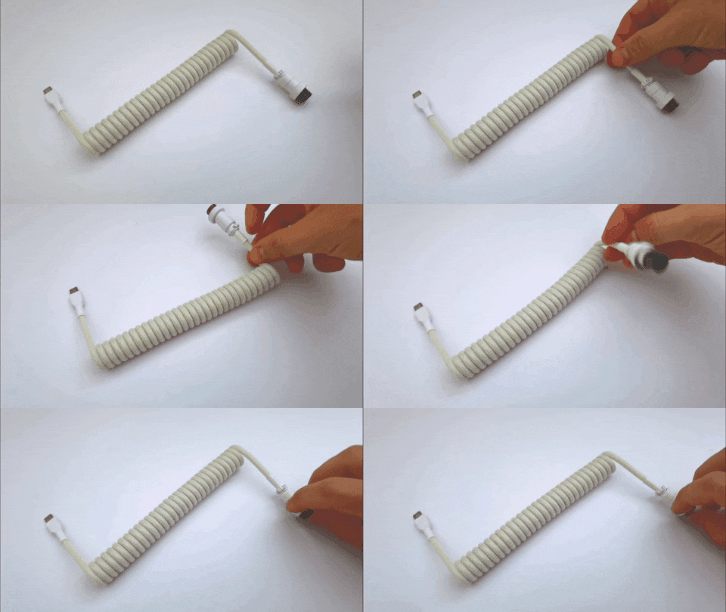
If your cable is using Direction 4 or 5 (where the connector faces backwards), the coil might appear twisted or uneven due to the host cable applying tension in the wrong direction.
Fix: The host cable is applying pressure on your coil's end and twisting it. You need to unplug the USB-A (or USB-C, depending on your host connection), grab the connector, and rotate it around its axis in the proper direction.


Issue 2: Loose Cable Coil
The coil seems a bit loose. That could happen for a few reasons:
- If the coil has been stretched beyond its abilities. Keep in mind that the coil is just for aesthetic purposes. Don't stretch it, and it will last a very long time.
-Fix: With Direction 4 or 5, you can grab the detachable connector before connecting it to the host half and rotate it clockwise. Don't overdo it because the coils won't look as even.
Cable Care Tips for Long-Term Use
✅ Tip 1: Keep Your USB-C Connector Straight
Avoid bending the last portion of the cable that leads into the USB-C plug. Bending it frequently puts pressure on the internal solder joints and could lead to connection issues over time.

✅ Tip 2: Protect Painted Connectors
If your cable connector is custom-painted, use a desk mat or soft surface to prevent scratches. Constantly moving it on your abrasive desk will cause little scratches over time. (like raw wood or aluminum) will eventually wear down the finish.
✅ Tip 3: Unscrew Gx12 and Gx16 Connectors Properly
For Gx16 and Gx12 connectors. When you are unplugging the connector, don't grab over the screwing ring and push backwards. The screwing ring is pretty sharp from the inside, and pressing it towards the body of your connector may harm the surface of the paint. Instead, grip the ends of the body and pull gently.
✅ Tip 4: Don’t Stretch the Coil
It might be tempting to play with the springy cable coil, but stretching it out can ruin its structure and consistency. Think of it like a suspension spring — keep it in its intended shape, and it’ll last forever.
✅ Tip 5: Don’t Swap Connectors Between Cables from different Custom Cable Brands
Only use the detachable ends that came with your cable supplier. Your cable won't work if mixed with parts from other brands. For example, our coil with a USB A/Host cable from another company won't work, because everybody uses their own soldering pattern.
✅ Tip 6: Pets might enjoy your custom cable as well
And finally, keep your dogge away from your coiled cable if possible. They may see your cable as a chew toy, lol!

P.S. This cable still works, by the way.
And that's pretty much all! If you still struggle setting up your coiled cable, don't hesitate to message us. Reach out to us anytime. We love this hobby, and we’re always happy to help fellow enthusiasts!
Author:
Ivailo K.

